Tuesday, December 9, 2008

Those were the Days...

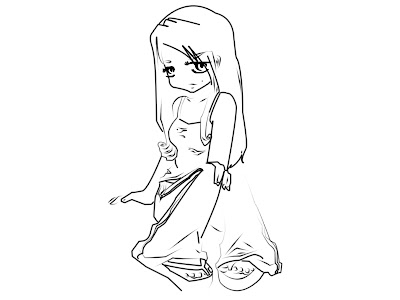
This is a few of my sketches that I did when I was in uni is almost 2 years old by now..hehe. I still loves drawing now but don't really committed to it anymore. This few days, I have been browsing several sites about handmade card. Really inspired by it coz the designs are just so cute & adorable...


Material(s) Used: Pencil, paper

What do you guys think of my drawing? I love my last drawing the most. I found them cute. And I absolutely love those shades in the picture. :P

Will be doing something creative soon...maybe next year. Short term goal...XD You will know by then.


Friday, December 5, 2008

Christmas Email Template

A Christmas email design that I did today...


Tool (s) Used: Adobe Illustrator CS3

Thursday, November 27, 2008

You're Truly Missed

This was created for a friend, Prema. She went to US for 2 years. She is truly missed by all her friends in Malaysia. Hope that she can cope with the environment there. Take good care of yourself, Prema... :P

Tool(s) Used: Adobe Photoshop CS3

Monday, November 24, 2008

2nd Illustration Coloring

This is my 2nd attempt to color illustration. Like the previous post, I color the background color of the image before proceed to the shadows & tones. This colored-lineart is used for this experiment.


This lineart is licensed under GPL ver.2. The details of the lineart are as below:
Licence: GPL ver. 2
Author: Aoi (a-o-i.deviantart.com)
Project: The Mana World


This is what I got after I color the background of the image.


Tool(s) Used: Adobe Photshop CS3

This is the final result of the process... :P Notice I have added some glow around the girl to make her abit glowing in the darkness of the night.
p/s: Special thanks to Aoi..


Sunday, November 23, 2008

Color Process Using Adobe Photoshop CS3

Have been always wanted to be able to color illustration just like anime & manga. Today, I finally got the chance to finished 1 of the illustration. :P happy2 me... This is the reference that I have used.


Before shadows & tone can be apply to a picture, it is always advisable to fill the background color of the picture. From there, you can proceed to the shadows & tones to make the picture more realistic. As what you can see from the image below, shadows & tones contribute alot to the details of the picture. This is what everyone should have for the 1st step. Just a flat color image without much details.

After adding shadows & tones on the image, you will be able to create a more realistic & lively picture. Now, background such as sky or grass can be added. I have add on a gradient blue sky rather than just a flat blue color sky.


Tool(s) Used: Adobe Photoshop CS3
Hope to be able to produce a better quality & complex illustration soon.
p/s: Special thanks to Jennifer Duong for her tutorial...

Tuesday, November 18, 2008

Illustration using Pen Tool in Adobe Photoshop CS3

I have been wondering how to draw nice illustration using Adobe Photoshop or Adobe Illustrator. I have been searching online tutorial for so many days. God knows how many days...The first tutorial was found in YouTube. However, it doesn't really help. The video showing the tutorial in fast mode. Can't actually followed the steps. The song played in the video was very nice indeed. I posted a comment asking the author how did he able to make such a smooth line in the illustration as weel as the name of the song. Sadly, there is not reply from him. I'm lucky enough to have someone who actually told me the name of the song.... XD


After a few days of hard work, I finally found out how to do a smooth line actually a nice tone line. Not just in a solid black line but a line that have different tone. hehe. I'm so happyyyyy...

Did some experiment on 1 of the linearts that I got from this site(http://mechanical-bunnies.com/tutorials/pstutorial.html).


This is what i have done using the pen tool...

Tool(s) Used: Adobe Photoshop CS3

Nice ah? :) By the way, this tracing back the line of a picture is called lineart. Normally, we will be drawing the line of a scanned picture before we starting to color it.

p/s: Special thanks to Jennifer Duong for her tutorial & image. :P


Saturday, November 15, 2008

Happy Anniversary

My first comic illustration...the background i got it from internet. I have combined a few background with my illustration. Both the boy & gal i did it on my own.

Before I started on the illustration, I sketched the drawing on a paper. Then, the outline of the sketches was retraced & color using Adobe Illustrator.

Software(s) Used: Adobe Illustrator CS3, Adobe Photoshop CS3
Material(s) Used: paper,pencil